
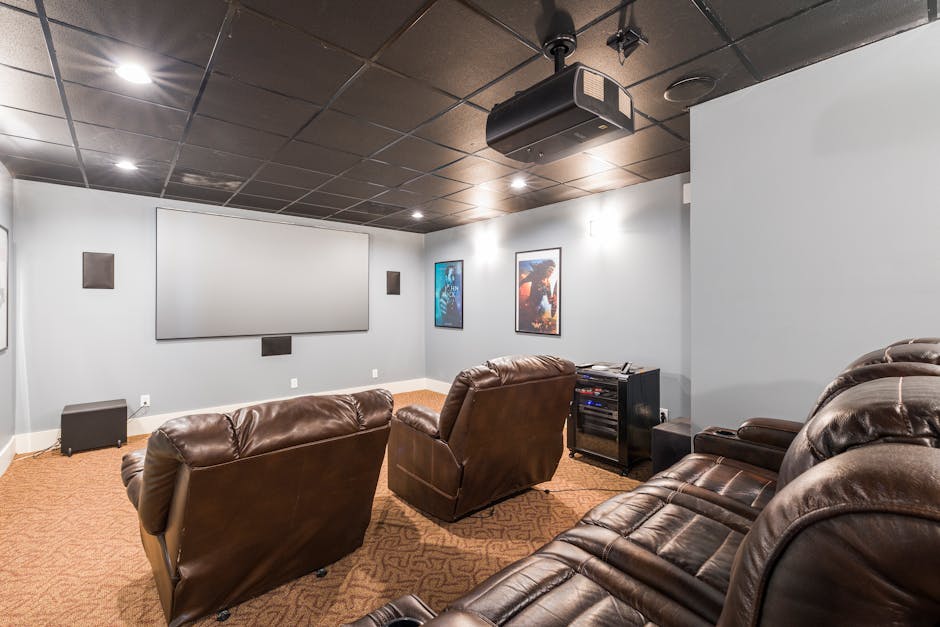
Home Theater Setup: Your Ultimate Guide to Immersive Entertainment
Transforming your living space into a captivating home theater is an achievable dream, offering an unparalleled entertainment experience that rivals commercial cinemas. This comprehensive guide will walk you through every crucial step, from foundational planning to the final calibration, ensuring a high-quality, immersive audiovisual journey.
1. Defining Your Vision and Budget: The Foundation of Success
Before diving into technical specifications, clarity on your desired experience and financial constraints is paramount.
- Purpose: Is this primarily for movie nights, gaming, sports, or a blend of everything? This dictates speaker configurations, display requirements, and potential acoustic treatments.
- Room Size and Layout: The dimensions of your chosen space significantly influence the scale of your equipment. A cramped room won’t benefit from a massive screen or a 7.1 surround sound system. Consider window placement, doors, and existing furniture.
- Budget Allocation: Home theater setups can range from surprisingly affordable to astronomically expensive. Create a realistic budget, allocating funds to key components like the display, audio system, seating, and potentially room treatments. Prioritize where your budget has the most impact for your specific needs.
2. The Visual Spectacle: Choosing Your Display
The display is the visual centerpiece of your home theater. Two primary options dominate the market:
- Televisions (TVs): Modern TVs offer stunning picture quality, ease of use, and integrated smart features.
- OLED: Renowned for perfect blacks, infinite contrast, and vibrant colors, OLED TVs are ideal for dark room environments. They excel in movie watching.
- QLED/Mini-LED: These technologies offer brighter images and better peak brightness than traditional LED TVs, making them suitable for rooms with ambient light. They provide excellent color volume and contrast.
- Screen Size: The “rule of thumb” for screen size is to sit at a distance where the screen fills approximately 30-40 degrees of your field of vision. For 4K content, a larger screen is more impactful. Calculate your seating distance and consult online calculators for recommended screen sizes.
- Resolution (4K/8K): 4K (Ultra HD) is the current standard and offers a significant upgrade over 1080p. 8K is emerging but content is limited, making 4K a more practical choice for most.
- HDR (High Dynamic Range): HDR formats like Dolby Vision and HDR10+ deliver a wider range of colors and contrast, resulting in more lifelike images. Ensure your display and content support these formats.
- Projectors and Screens: For a truly cinematic feel and larger-than-life images, projectors are the ultimate choice.
- Projector Types: DLP and LCD are the most common technologies. DLP generally offers better contrast and motion handling, while LCD can provide brighter images. Laser projectors offer longer lifespan and consistent brightness.
- Throw Ratio: This determines how far the projector needs to be from the screen to create a specific image size. Consider your room’s dimensions.
- Screen Material: Different screen materials affect brightness, contrast, and viewing angles. White, grey, and acoustically transparent screens are common choices. Consider ambient light rejection (ALR) screens if your room isn’t completely light-controlled.
- Screen Size: Projectors allow for much larger screen sizes than TVs, creating a truly immersive experience.
3. The Sonic Landscape: Crafting Your Audio System
A compelling home theater experience is as much about sound as it is about visuals.
- The Receiver (AVR): The Brains of the Operation
- Channels: The number of channels dictates the number of speakers your AVR can power (e.g., 5.1, 7.1, 9.2). More channels allow for more immersive surround sound.
- Power Output: Ensure the AVR has enough power (watts per channel) to adequately drive your chosen speakers in your room size.
- HDMI Inputs/Outputs: Look for enough HDMI ports to connect all your sources (Blu-ray player, game console, streaming devices) and support for the latest HDMI standards (e.g., HDMI 2.1 for 4K/120Hz gaming).
- Surround Sound Formats: Support for Dolby Atmos and DTS:X is crucial for the most immersive 3D audio experiences.
- Room Calibration: Many AVRs include automatic room calibration systems (e.g., Audyssey, YPAO) to optimize sound based on your room’s acoustics.
- Speaker Configurations:
- 2.1 System: Two front speakers and a subwoofer. A good starting point for smaller rooms or those on a tighter budget.
- 5.1 System: Front left, front right, center channel, surround left, surround right, and a subwoofer. The most common and effective setup for a balanced surround experience.
- 7.1 System: Adds two rear surround speakers for even greater immersion.
- Dolby Atmos/DTS:X (Immersive Audio): These systems incorporate height channels (ceiling speakers or upward-firing modules) to create a three-dimensional soundstage, with sound coming from above.
- Speaker Types:
- Front Left/Right: Handle the main stereo soundstage.
- Center Channel: Crucial for dialogue clarity. Position it directly above or below your display.
- Surround Speakers: Create the immersive ambient sound effects.
- Subwoofer: Reproduces low-frequency effects (LFE), adding impact and depth to explosions, music, and more. Consider the size of your room when choosing a subwoofer’s size and power.
- Height Channels: For Dolby Atmos/DTS:X, these can be in-ceiling speakers or upward-firing speakers placed on top of your front or surround speakers.
- Placement is Key: Proper speaker placement is as critical as the speakers themselves. Consult Dolby’s and DTS’s recommended placement guidelines for optimal sound imaging.
4. The Command Center: Source Devices and Connectivity
Your home theater needs reliable sources for content and seamless connectivity.
- Blu-ray Player/4K UHD Player: For the highest quality video and audio, a dedicated disc player is essential.
- Streaming Devices: Smart TVs have built-in apps, but dedicated streaming boxes (Apple TV, Roku, Nvidia Shield) often offer better performance and a wider selection of apps.
- Game Consoles: Modern consoles offer incredible gaming experiences with high frame rates and resolutions.
- Cables: Invest in high-quality HDMI cables that support the latest standards (e.g., HDMI 2.1 for 4K/120Hz and eARC). Speaker wire quality also matters; thicker gauges are generally better for longer runs.
5. The Comfort Zone: Seating and Acoustics
Comfort and acoustics are often overlooked but significantly contribute to the overall experience.
- Seating:
- Comfort: Invest in comfortable seating that allows for long viewing sessions. Recliners, sectionals, or dedicated theater seating are popular choices.
- Viewing Angle: Ensure all seats have a good line of sight to the display and speakers. Avoid placing seating too close to the display.
- Acoustic Treatments:
- Room Acoustics: Hard surfaces (walls, floors, ceilings) reflect sound, leading to echoes and muddiness. Soft furnishings like carpets, curtains, and upholstered furniture help absorb sound.
- Acoustic Panels: Strategically placed acoustic panels can absorb or diffuse sound, reducing reflections and improving clarity.
- Bass Traps: These are essential for controlling low-frequency sound waves, which can be problematic in many rooms.
- Room Symmetry: Aim for as much symmetry as possible in your room layout to create a more consistent soundstage.
6. The Finishing Touches: Lighting and Control
Subtle details can elevate your home theater from good to exceptional.
- Lighting:
- Ambient Lighting: Dimmable lighting is crucial for creating the right atmosphere. Consider recessed lighting, sconces, or LED strip lighting.
- Light Control: Minimize ambient light from windows and doors with blackout curtains or blinds.
- Accent Lighting: Subtle accent lighting can highlight architectural features or artwork without distracting from the screen.
- Universal Remote Control: A good universal remote can simplify operation, consolidating control of all your devices into one intuitive interface.
- Power Management: Consider a surge protector or power conditioner to protect your valuable equipment from power fluctuations.
7. Calibration and Fine-Tuning: The Final Polish
Once everything is set up, calibration is essential to unlock the full potential of your system.
- Display Calibration: Use built-in picture modes or calibration discs (e.g., Spears & Munsil UHD Benchmark) to adjust brightness, contrast, color, and sharpness for optimal picture quality. Consider professional calibration for the ultimate accuracy.
- Audio Calibration: Utilize your AVR’s room calibration system. Manually verify speaker levels and distances if necessary.
- Subwoofer Integration: Fine-tune the subwoofer’s crossover frequency and level to seamlessly blend with your main speakers.
By meticulously following these steps, you’ll create a home theater that delivers