
The Ultimate Guide to Choosing the Best Printer for Your Home
Navigating the vast landscape of home printers can feel like an expedition without a map. From inkjet marvels to laser powerhouses, each technology boasts its own strengths and weaknesses, and the sheer volume of features can be overwhelming. This guide cuts through the jargon and complexities, equipping you with the knowledge to select the perfect printing companion for your unique needs.
1. Understanding Your Printing Needs: The Foundation of Choice
Before diving into printer specifications, a crucial first step is to honestly assess your printing habits. This introspection will be your compass.
- Volume and Frequency: Do you print a few pages a month, or do you regularly churn out documents? High-volume printing demands robust machines and cost-effective consumables.
- Content Type: Are you primarily printing text-based documents, photos, graphics, or a mix? This dictates the importance of color accuracy, resolution, and media handling.
- Print Quality Expectations: Is “good enough” acceptable for your documents, or do you require professional-grade photo prints or sharp, crisp text for important reports?
- Connectivity Preferences: Do you need wireless printing from multiple devices, or is a simple USB connection sufficient?
- Budget: This is a significant factor. Consider not only the upfront cost of the printer but also the ongoing expense of ink or toner cartridges.
2. Inkjet vs. Laser: The Core Technological Divide
The fundamental choice boils down to two primary printing technologies: inkjet and laser. Each excels in different areas.
- Inkjet Printers: These printers spray microscopic droplets of liquid ink onto paper.
- Pros:
- Excellent for Photos and Graphics: Inkjets produce vibrant, smooth color gradients, making them ideal for printing photographs and detailed graphics.
- Lower Upfront Cost: Generally, inkjet printers are more affordable to purchase initially.
- Versatile Media Handling: Can often handle a wider range of paper types, including photo paper, cardstock, and envelopes.
- Compact Size: Many inkjet models are designed to be space-saving.
- Cons:
- Higher Cost Per Page: Ink cartridges can be expensive, and their yield (pages per cartridge) is often lower than toner.
- Slower Printing Speeds: Inkjets tend to be slower, especially for color printing.
- Ink Smudging: If not allowed to dry properly, ink can smudge, particularly on glossy paper.
- Clogging Risk: If not used regularly, print heads can clog, leading to maintenance issues.
- Pros:
- Laser Printers: These printers use a laser beam to create an electrostatic image on a drum, which then attracts toner powder that is fused onto the paper with heat.
- Pros:
- Faster Printing Speeds: Lasers are significantly faster, especially for monochrome documents.
- Lower Cost Per Page (for text): Toner cartridges, while more expensive upfront, typically yield many more pages, making them more economical for high-volume text printing.
- Sharp, Crisp Text: Produce incredibly sharp and professional-looking text, ideal for documents.
- Durability: Prints are smudge-proof and water-resistant once fused.
- No Clogging Issues: Toner doesn’t dry out, eliminating the clogging problem common with inkjets.
- Cons:
- Higher Upfront Cost: Laser printers are generally more expensive to buy, especially color laser models.
- Less Ideal for Photos: While color lasers have improved, they typically can’t match the color vibrancy and subtle gradations of high-quality inkjet photo prints.
- Larger Footprint: Often larger and heavier than comparable inkjet printers.
- Limited Media Options: May not handle specialty papers or very thick cardstock as well as inkjets.
- Pros:
3. Key Features to Consider:
Once you’ve decided on the core technology, delve into the specific features that will enhance your printing experience.
- All-in-One (AIO) vs. Single-Function:
- AIO Printers: Combine printing, scanning, copying, and sometimes faxing into a single unit. They offer excellent convenience and space-saving benefits for most home users.
- Single-Function Printers: Dedicated solely to printing. If you already have a scanner or don’t need one, a single-function printer might offer a slightly lower price point or higher print quality for its price.
- Print Resolution (DPI – Dots Per Inch): Higher DPI generally means sharper images and finer detail. For text, 600 DPI is usually sufficient. For photos, aim for 4800 x 1200 DPI or higher for inkjet printers. For laser, the DPI refers to the toner deposition, with 1200 x 1200 DPI being a common high-quality standard.
- Print Speed (PPM – Pages Per Minute): This is a crucial metric, especially for high-volume printing. Remember that advertised speeds often refer to draft mode or monochrome printing. Always look for speeds for both color and black-and-white, and consider the ISO standard speeds for more realistic comparisons.
- Connectivity Options:
- USB: The most basic connection, directly linking the printer to a single computer.
- Wi-Fi: Essential for wireless printing from laptops, smartphones, and tablets. Look for dual-band Wi-Fi (2.4GHz and 5GHz) for better performance and range.
- Ethernet: A wired network connection, offering stable and fast connectivity for shared network environments.
- Wi-Fi Direct/Mobile Printing: Allows devices to connect directly to the printer without a router, and support for technologies like Apple AirPrint, Google Cloud Print, and Mopria makes mobile printing seamless.
- Paper Handling:
- Paper Tray Capacity: How many sheets can the printer hold? Higher capacity means fewer reloads.
- Automatic Document Feeder (ADF): Found on many AIOs, an ADF allows you to scan or copy multiple pages automatically, saving significant time.
- Duplex Printing (Automatic Two-Sided Printing): Saves paper and time by automatically printing on both sides of a page. A must-have for eco-conscious users and those who print a lot of documents.
- Media Support: Check if the printer can handle different paper sizes (letter, legal, A4, photo sizes) and types (plain paper, glossy photo paper, cardstock, envelopes).
- Ink/Toner Cartridge System:
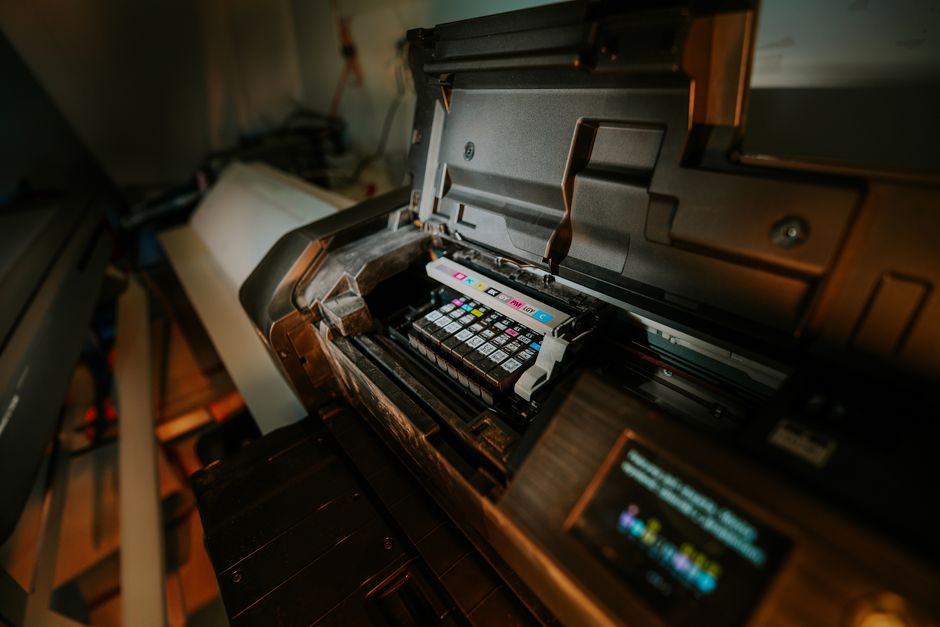
- Separate Color Cartridges: Most inkjets use separate cartridges for black, cyan, magenta, and yellow. This is more economical as you only replace the color that runs out.
- All-in-One Cartridges: Some older or very basic inkjets combine all colors into one cartridge. When one color runs out, you have to replace the entire cartridge, which is very inefficient.
- Ink Tank Systems (Cartridge-Free): Increasingly popular, these printers have built-in reservoirs that you refill with ink bottles. While the initial printer cost might be higher, the cost per page is dramatically lower, making them ideal for very high-volume users.
- Toner Yield: For laser printers, check the page yield of the toner cartridges. This is a critical factor in determining the cost per page.
- Print Quality for Photos: If photo printing is a priority, look for printers with dedicated photo cartridges (e.g., red, blue, gray) for a wider color gamut and smoother skin tones. Higher print resolutions and support for specific photo paper types are also important.
- Scanner Capabilities: For AIOs, consider the scanner’s optical resolution (higher is better for detail), scan speed, and whether it has an ADF.
- Display and Controls: A clear, color touchscreen display can make navigating menus and settings much easier.
- Durability and Build Quality: While harder to gauge from specs alone, reading reviews can give you an idea of how well a printer holds up over time.
4. Navigating Ink and Toner Costs: The Long-Term Investment
The initial purchase price of a printer is only part of the equation. The ongoing cost of consumables can significantly impact your budget.
- Inkjet Cartridge Costs: Research the price of replacement ink cartridges for the models you’re considering. Also, check the “page yield” – the estimated number of pages a cartridge can print. Divide the cartridge price by the page yield to get a rough cost per page. Be aware that manufacturers sometimes use “starter” cartridges with lower yields.
- Toner Cartridge Costs: Similar to ink, toner cartridges have a page yield. Laser printers generally have a lower cost per page for black-and-white printing compared to inkjets, making them a better choice for high-volume text documents.
- Ink Tank Systems: These offer the lowest cost per page by far. While the initial printer investment is higher, the savings over time can be substantial for frequent printers.
- Third-Party Cartridges: While often cheaper, using third-party or refilled cartridges can sometimes void your printer’s warranty or lead to suboptimal print quality. Proceed with caution and research reputable brands.
**5. Popular Printer